Architecture Overview
The basic workflow of RepoLaunch agent is as follows:
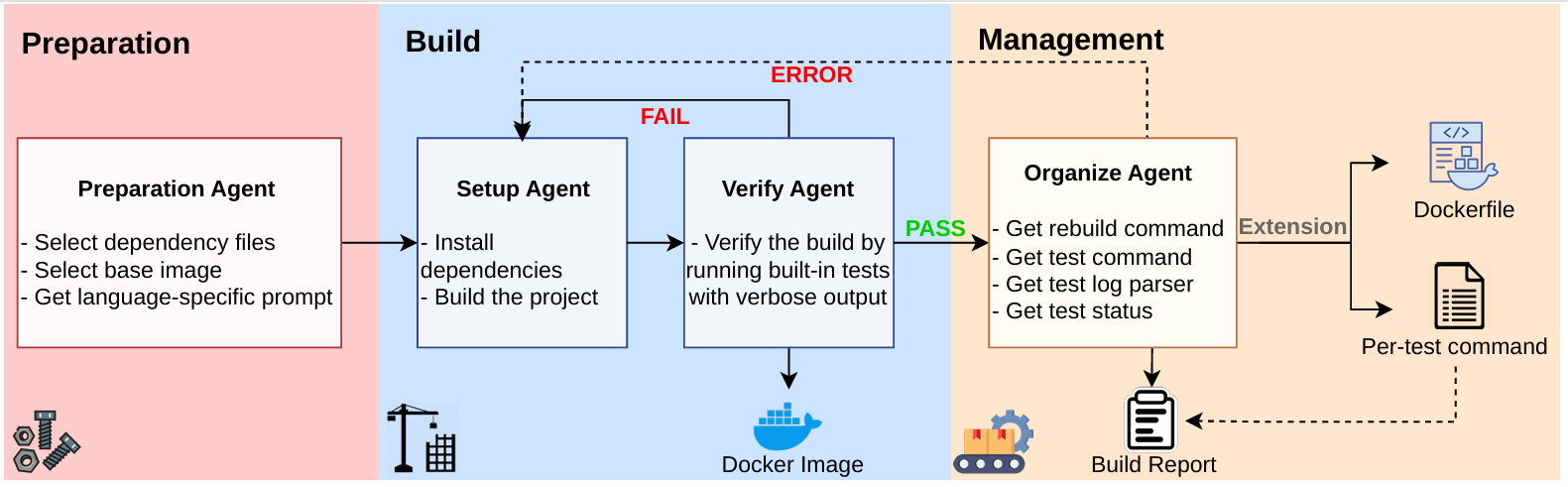
Trajectory & result demos of RepoLaunch agent: RepoLaunch-Trajectory-Archive.
Run RepoLaunch: A Quick Start
We provide an example input file data/examples/dataset.jsonl and a run config data/examples/config.json in examples to help you quickly go through the launch process. Expected output files are data/examples/result.jsonl and data/examples/playground/.
Before getting started, please set your TAVILY_API_KEY environment variable. We use tavily for LLM search engine support.
export TAVILY_API_KEY=...
We use LiteLLM for max compatibility of LLM API, AND to enable custom API deployment for agentic training. Export your LLM API KEY, say OPENAI_API_KEY, ANTHROPIC_API_KEY...
export OPENAI_API_KEY=...
We have made launch/utilities/llm.py compatible to both traditional completion API and OpenAI responses API.
If your llm provider requires user identity login for API usage or requires some weird settings like Gemini thinking signaturue, go to modify launch/utilities/llm.py.
Start repo launch process:
launch data/examples/config.json
# equivalently: python -m launch.run --config-path data/examples/config.json
Reuse RepoLaunch results for different commits of the same repo
If your dataset to be launched contains multiple commits from the same repo, we suggest you referring to the solution in Development-agent-memory.md to launch your dataset instead of using launch data/examples/config.json directly.
To customize your input dataset and run config, please go to the next page: Customize Input & Config.